For Graduate and Doctoral Students

Your Paper,Formatted to YourStyle Guide.

Upload your Word file or PDF. In about a minute you get it back with the title page, contents, margins, headings, footnotes, and bibliography done the way your school’s style guide asks. Works for Liberty, Regent, Oral Roberts, Dallas Theological Seminary, Southeastern, New Orleans Baptist, Global Awakening, and any class that uses APA 7.

NOT GENERATIVE AIFormatting software only. It never writes, rewrites, or suggests a single word of your paper.
🔒 Your paper is formatted inside your own browser. It never gets uploaded to us.
Introduction
1
✓Title Page
✓Contents With Page Numbers
✓Footnotes, Chicago Style
✓Bibliography
Title PageRoman Numeral Front MatterContents With Real Page NumbersFour Heading LevelsBlock QuotationsFootnotes That Restart Each ChapterNo More Ibid.Hanging-Indent BibliographySmart Quotes and En Dashes
Not Generative AI

Formatting Software, Not a Writing Tool

Many schools now limit or ban generative AI in student work. Style Guide Pro is not generative AI. It works like the styles in Microsoft Word, applying a fixed set of formatting rules to the words you already wrote. It never writes, rewrites, paraphrases, or summarizes your content, so your paper stays entirely your own.

What It Changes

✓Margins, fonts, spacing, and page numbers
✓Title page, contents, and heading styles
✓Footnote and bibliography layout
✕Your sentences, arguments, or research
✕Your sources or what they say
0Pages in the dissertation we tested it on, formatted in seconds
0Minute or less from upload to a finished Word file
0Page numbers you have to type into your table of contents
What It Does

Everything the Style Guide Asks For, Done for You

Style Guide Pro reads your paper the way a careful editor would, then rebuilds it to your style guide from the first page to the last.

1

Title Page

Built in your school’s wording, order, and spacing, from a class paper cover page to the dissertation title page.

ii

Front Matter

Abstract, copyright page, and contents numbered in lowercase roman numerals, with page 1 where your text begins.

≡

Contents

Built in your school’s layout with dot leaders and the real page numbers already filled in, plus lists of tables and figures.

H

Headings

Every heading level styled the way your guide asks: bold, centered, underlined, or run-in for APA, with headline-style capitalization.

“

Block Quotes

Single-spaced and indented, with Scripture references and quotation marks cleaned up along the way.

¹

Footnotes

The right size, numbering, and spacing for your school. Where your guide bans Ibid., it becomes a short note, and chapters can start with a full citation.

A–Z

Bibliography

Alphabetized with hanging indents and your school’s spacing. APA papers get a double-spaced References page.

PDF

Word or PDF

Start from a Word file or a PDF. Either way you get back a Word document you can keep editing.

Supported Schools

Pick Your School and Program

Each one follows that school’s published style guide. Choose it when you upload, and the rules change with it.

LU

Liberty University

Graduate papers, theses, and dissertations, plus the Doctor of Ministry thesis project.

RU

Regent University

School of Divinity papers in Turabian, and APA 7 for counseling, human services, and leadership.

ORU

Oral Roberts University

M.A. theses, research papers, and the Ph.D. dissertation, including the Books, Periodicals, and Other Sources bibliography.

DTS

Dallas Theological Seminary

Theses, dissertations, and research papers under the DTS supplement to Turabian.

SE

Southeastern Baptist

Ph.D., Th.M., and Ed.D. dissertations, and D.Min. projects with their wider side margins.

NO

New Orleans Baptist

Ph.D. and Th.D. dissertations, and D.Min. seminar papers and project proposals.

GA

Global Awakening

D.Min. and Th.D. class papers, the candidacy review, and the final thesis.

APA

APA 7 Student Papers

For undergraduate and graduate courses anywhere, following the APA student paper format as the Purdue OWL lays it out.

The Report

It Also Tells You What Only You Can Fix

Some things a computer should not guess. Every paper comes back with a short, plain list of items that need your eyes before you submit, checked against the style guide’s rules.

Needs You

!Scripture is quoted, but no footnote names the Bible translation.
!Add the earned degree after your mentor’s name on the title page.
!Insert your program’s signed approval page after the title page.
✓Replaced 14 “Ibid.” notes with shortened notes.
✓Built the table of contents with page numbers filled in.
A Real Example

See a Real Paper, Before and After

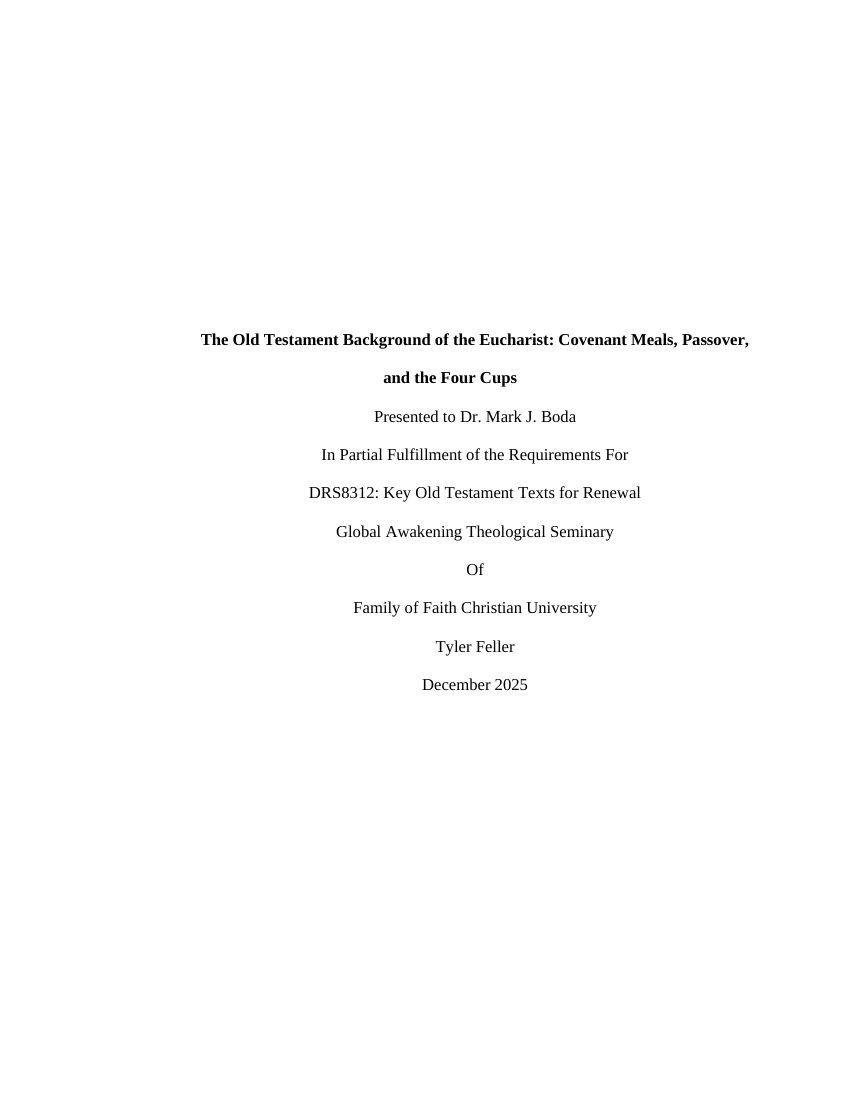
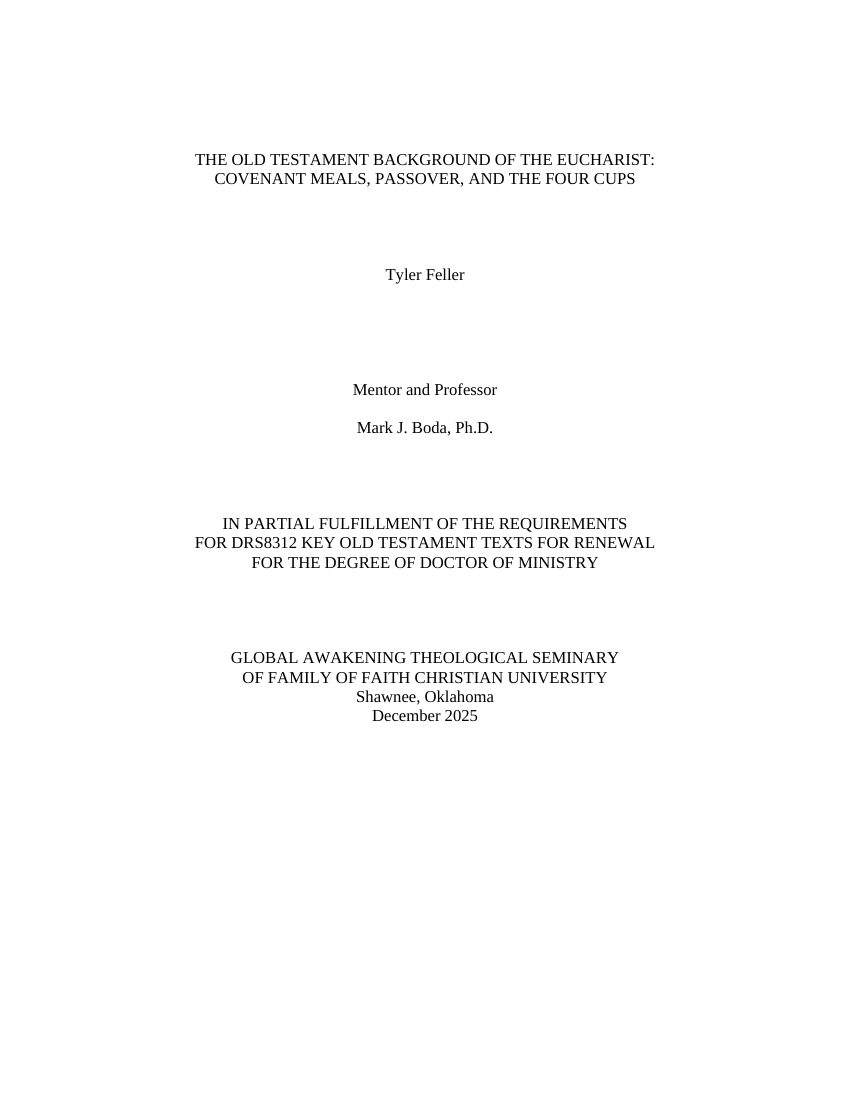
This is an actual GATS class paper on the Old Testament background of the Eucharist. Drag the slider to compare the original with what Style Guide Pro handed back.

Original paper pageFormatted paper page
BEFOREAFTER

From DRS8312, Key Old Testament Texts for Renewal. Shared with the author’s permission.

The Tour

See How It Works in Under a Minute

How It Works

Three Steps to a Finished Paper

Upload Your Paper

Drop in your Word document or PDF and choose class paper or doctoral thesis.

Check the Details

Confirm your title page information and the heading levels it found. Change anything with one click.

Download and Submit

Get your formatted Word file and your Needs You list. Save it as a PDF for Populi and you are done.

Pricing

Two Simple Plans

The annual plan covers every class paper, your candidacy review, and your final dissertation with no page limit. The monthly plan includes 50 formatted pages a month. Cancel anytime from your account.

Style Guide Pro
$99per year
That is $8.25 a month, billed once a year. Unlimited pages.
  • Word or PDF, class papers to dissertations
  • Not generative AI, never touches your words
  • Unlimited pages on the annual plan
  • Contents with page numbers filled in
  • Footnote and bibliography cleanup
  • Your Needs You report on every paper
  • Your paper never leaves your computer
Secure checkout by Stripe. Already subscribed? Sign in.
Questions

Frequently Asked Questions

Which schools does it support?

Liberty University, Regent University, Oral Roberts University, Dallas Theological Seminary, Southeastern Baptist Theological Seminary, New Orleans Baptist Theological Seminary, and Global Awakening Theological Seminary, plus APA 7 student papers for any course. You pick your school and program when you upload.

Is this generative AI? Will it break my school’s AI policy?

Style Guide Pro is not generative AI. It is rules-based formatting software that applies your style guide’s layout to the words you wrote, the same way Word’s built-in styles do. It never writes, rewrites, or suggests content. School AI policies are aimed at tools that generate or alter your work. If you are unsure about your school’s policy, show this page to your professor.

Is my paper private?

Your paper is formatted inside your own web browser. It is never uploaded to our servers, so your research and your writing stay on your computer.

Can I start from a PDF?

Yes. Drop in a PDF and Style Guide Pro rebuilds it as a Word document, keeping your headings, footnotes, and paragraphs, then formats it.

Which version of the style guide does it follow?

Each school’s current published guide: Liberty’s Turabian quick guide and D.Min. handbook, the Regent Writing Lab checklist and program handbooks, ORU’s research and writing manuals, the DTS supplement to Turabian, the SEBTS template, the NOBTS dissertation and D.Min. templates, the GATS Doctoral Style Guide, and the APA Publication Manual (7th edition). Professors and programs sometimes add their own rules, so always confirm with yours.

What if a page number in the contents is off after I edit?

The contents come filled in. If you change the paper later and pages move, right-click the contents in Word and choose Update Field, then Update entire table.

How do I cancel?

Sign in, choose Manage Billing, and cancel in two clicks. You keep access until the end of the period you paid for.
Style Guide Pro

Spend Your Time on Your Research and Let Us Handle the Margins.

Get Your Paper Done Tonight →